TUnit, Aspire, and Playwright: A Powerful Triple Threat for Automated Testing and Agentic Workflows
Overview
.
The content below is the direct result of a new Pluralsight course that I've done: Automation Testing Strategies with ASP.NET Core 10.
How about an awesome automated testing framework that:
- Allows full testing without deploying the application
- Has complete logs and OpenTelemetry traces from the application for each test on its own
- Provides detailed code coverage information for all code in your application
- Includes screenshots and video recordings of automated tests of your UI easily
- Can be run both locally and in a continuous integration (CI) pipeline easily
- Is super fast
- Enables AI-coding agent iteration that results in successful implemetation of features that include tests and video recordings of the updated application
Everything in this post is working code in the automated-testing-aspnetcore10 repo. The app under test ("CarvedRock Fitness") is a distributed ASP.NET Core 10 application: a Razor Pages front end, a REST API, an MCP server, an AI agent, Postgres, and a mail server -- all composed with Aspire.
To set expectations on the "super fast" claim up front, here's what the full suite looks like today: 54 tests across three projects, and about 32 seconds of wall clock from the first test starting to the last one finishing. That includes standing up the entire distributed application in real containers and driving Chromium browser sessions through it.
| Test project | Tests | Duration |
|---|---|---|
CarvedRock.UnitTests |
20 | 0.43 s |
CarvedRock.ApiTests |
16 | 8.5 s |
CarvedRock.AppTests |
18 | 40.7 s |
The three projects run concurrently, which is why the wall clock is shorter
than the sum -- and why the AppTests number (which is dominated by Aspire
startup) is the one that actually gates the run.
Overall Setup
The following is what has been set up in a sample repo and is what I think the building blocks for an amazing test automation framework is.
- A TUnit test project for your unit tests
- A separate TUnit test proejct for each ASP.NET Core
app you want to test on its own (with
WebApplicationFactory). - A TUnit test project for the entire application that
will use the Aspire
DistributedApplicationTestingBuilder. - When running tests:
- Create coverage outputs
- Use a
testconfig.jsonfile to provide exclusions for code coverage reporting (e.g. source generated content) - Specify output directories for output files
- Create a coverage report using the excellent reportgenerator dotnet tool
- Create a script that can run all of your tests locally that will:
- Delete artifacts from previous runs
- Run all of the tests with the above settings
- Create the coverage report based on the test run output
- Optionally open each of the reports for human review
- Create a continuous integration (CI) pipeline that will do all of the above, include good information in the pipeline summary, and provide the ability to download and review the detailed artifacts and reports from the test run
One piece of required plumbing: a global.json in the root of
the repo that opts into Microsoft Testing Platform (MTP) as the test runner.
1{
2  "test": {
3    "runner": "Microsoft.Testing.Platform"
4  }
5}
With that in place, dotnet test accepts platform options directly --
--coverage, --coverage-settings, --treenode-filter, --report-trx --
rather than needing a .runsettings file and VSTest adapter indirection. That
single file is what lets the local script and the CI pipeline share essentially
the same command.
Why three test projects instead of one? Mostly because of top-level statements. Referring to
Programfrom more than oneWebApplicationFactory<Program>target gets ambiguous, and rather than abandon top-level statements or fight the tooling, separate projects are the path of least resistance. It turns out to be a happy accident: each project has a totally different cost profile and set of dependencies, so you can run just the fast ones during a tight edit loop.
Why TUnit as the Testing Framework?
There are a LOT of reasons to like TUnit as the backbone of the automated testing framework for your application(s):
- Adds simplicity and features to both
WebApplicationFactoryandDistributedApplicationTestingBuilder - Fast - uses source-generation and not reflection; aggressive parallelization by default; can be compiled for AOT for even more speed
- Creates an excellent "results report" that shows test execution details - how the tests were run - as well as showing logs, traces, and other information about each test individually
- Uses Microsoft Testing Platform and simplifies capture of code coverage details
- Easy-to-use API that keeps tests simple but doesn't limit capabiltiies
- "Batteries included" approach: built-in mocking (including HTTP mocking) and first class integration with Playwright
That first bullet is the one that ties this whole post together. The three "threats" in the title aren't three separate tools you glue together yourself -- TUnit ships first-class integration packages for each of them:
| Package | What it gives you |
|---|---|
TUnit |
The framework: source-generated discovery, assertions, hooks, parallelism |
TUnit.Mocks |
Source-generated, AOT-friendly mocking (no Castle.Core proxies) |
TUnit.AspNetCore |
WebApplicationFactory-based fixtures and a test base class |
TUnit.Aspire |
Whole-distributed-app fixtures with resource waiting + OTel capture |
TUnit.Playwright |
Browser/context/page lifecycle managed for you |
A few API conventions show up in every snippet below, so they're worth calling out once:
[Test]replaces[Fact]/[TestMethod][Arguments(...)]replaces[InlineData(...)][Before(Test)],[Before(Class)],[After(TestSession)]are the hooks[ClassDataSource<T>(Shared = SharedType.PerTestSession)]is how expensive fixtures get created once and shared[DependsOn(nameof(OtherTest))],[NotInParallel], and[ParallelLimiter<T>]are the escape hatches from "everything runs in parallel by default"
Assertions are async and chainable, and a single await can check multiple members of the same result.
1await Assert.That(result)
2    .Member(r => r.Errors, errors => errors.IsEmpty())
3    .And
4    .Member(r => r.IsValid, valid => valid.IsTrue());
One small quality-of-life thing: rather than repeating using statements in
every test file, the common namespaces are declared once as <Using> items in
each test .csproj:
1<ItemGroup>
2  <Using Include="System.Net" />
3  <Using Include="System.Net.Http.Json" />
4  <Using Include="CarvedRock.ApiTests.Utils" />
5  <Using Include="Microsoft.AspNetCore.Mvc" />
6  <Using Include="TUnit.Core.Logging" />
7</ItemGroup>
That's why the test files that follow look so short -- they really are that short in the repo.
Unit Tests
The unit test project is the boring one, and that's the point. No I/O, no containers, no HTTP -- just business logic and validators. Twenty tests, 430 milliseconds, and the whole project file is this:
 1<Project Sdk="Microsoft.NET.Sdk">
 2  <PropertyGroup>
 3    <ImplicitUsings>enable</ImplicitUsings>
 4    <Nullable>enable</Nullable>
 5    <OutputType>Exe</OutputType>
 6    <TargetFramework>net10.0</TargetFramework>
 7  </PropertyGroup>
 8  <ItemGroup>
 9    <PackageReference Include="TUnit" Version="1.6*" />
10    <PackageReference Include="TUnit.Mocks" Version="1.65.38" />
11  </ItemGroup>
12  <ItemGroup>
13    <ProjectReference Include="..\..\CarvedRock.Domain\CarvedRock.Domain.csproj" />
14  </ItemGroup>
15</Project>
The main subject here is NewProductValidator, a FluentValidation validator with
a wrinkle that makes it a good example: most of its rules are pure, but one of
them (UniqueName) has to ask the repository whether a name is already taken.
That's the dependency we need to mock.
Interface Mocking
TUnit.Mocks is source-generated, so there's no new Mock<T>() ceremony and no
.Object unwrapping -- you call .Mock() directly on the interface, and the
generated mock is the interface:
 1public class ProductValidationTests
 2{
 3    private static ICarvedRockRepository _mockedRepo = null!;
 4
 5    [Before(Class)]
 6    public static void SetupDatabaseMock(ClassHookContext context)
 7    {
 8        var mock = ICarvedRockRepository.Mock();
 9        mock.IsProductNameUniqueAsync(Any()).Returns(true);
10        mock.IsProductNameUniqueAsync("duplicate").Returns(false);
11        _mockedRepo = mock;
12    }
Two things worth noticing. First, Any() doesn't need a type argument -- the
generated mock already knows the parameter type, so the setup reads like the call
site. Second, the more specific setup for "duplicate" wins over the Any()
one, which means a single mock configured once in a [Before(Class)] hook covers
both the happy path and the collision path for every test in the class.
Now the tests are just arrange/act/assert with no mock noise in them at all:
 1[Test]
 2public async Task DuplicateNameFails()
 3{
 4    IValidator<NewProductModel> validator = new NewProductValidator(_mockedRepo);
 5
 6    var newProduct = new NewProductModel
 7    {
 8        Name = "duplicate",
 9        Category = "boots",
10        Description = "",
11        ImgUrl = "https://some.place/image.png",
12        Price = 59.99
13    };
14
15    var result = await validator.ValidateAsync(newProduct,
16        opts => opts.IncludeAllRuleSets());
17
18    await Assert.That(result.Errors)
19                .Contains(err => err.ErrorMessage ==
20                    "A product with the same name already exists.");
21}
Verifying that a call happened (rather than stubbing what it returns) is a one-liner, and it reads as the call itself:
 1[Test]
 2public async Task ClearCartAsyncCallsRepository()
 3{
 4    var mockRepo = ICarvedRockRepository.Mock();
 5    var validator = new AddToCartValidator(mockRepo);
 6    var cartLogic = new CartLogic(mockRepo, validator, NullLogger<CartLogic>.Instance);
 7
 8    await cartLogic.ClearCartAsync("user-1");
 9
10    mockRepo.ClearCartAsync("user-1").WasCalled();
11}
Exception assertions use the same Assert.That entry point, with a lambda
instead of a value:
1await Assert.That(async () => await orderLogic.PlaceOrderAsync("user-1", "user@test.com"))
2    .Throws<InvalidOperationException>()
3    .WithMessageContaining("Cannot place an order with an empty cart.");
Data-Driven Tests
Validators are the classic case where one test method and a table of inputs beats fifteen near-identical methods. TUnit gives you a few ways to build that table, and it's worth knowing all of them because they trade off differently.
Inline [Arguments] is the simplest -- and DisplayName is what keeps the
report readable when the arguments themselves are meaningless in a test list:
 1[Test]
 2[Arguments(null, "boots", "really nice footwear - you'll love them!",
 3                "https://some.place/image.png", 59.99,
 4                "Name is required.",
 5                DisplayName = "Inline - missing product name")]
 6[Arguments("Fancy Boot", "boots", "really nice footwear - you'll love them!",
 7                "https://some.place/image.png", 49.99,
 8                "Price for boots must be between $50.00 and $300.00.",
 9                DisplayName = "Inline - price too low")]
10public async Task LongSingleValidationFailures(string? name, string? category,
11    string? description, string? imageUrl, double price, string expectedMessage)
12{
13    var productToValidate = new NewProductModel { /* ...from the arguments... */ };
14
15    var result = await _validator.ValidateAsync(productToValidate,
16        opts => opts.IncludeAllRuleSets());
17
18    await Assert.That(result.Errors)
19        .Contains(err => err.ErrorMessage == expectedMessage);
20}
Six positional parameters is about where inline arguments stop being pleasant,
which is the cue to move to a [MethodDataSource] and hand over real objects
instead. Wrapping each row in a TestDataRow<T> lets you attach a display name
to it:
 1[Test]
 2[MethodDataSource(nameof(SingleFailureDataSourceWithNames))]
 3public async Task SingleValidationFailures(NewProductModel productToValidate,
 4        string expectedMessage)
 5{
 6    var result = await _validator.ValidateAsync(productToValidate,
 7        opts => opts.IncludeAllRuleSets());
 8
 9    await Assert.That(result.Errors)
10        .Contains(err => err.ErrorMessage == expectedMessage);
11}
12
13public static IEnumerable<Func<TestDataRow<(NewProductModel Product,
14            string ExpectedMessage)>>> SingleFailureDataSourceWithNames()
15{
16    yield return () => new((new NewProductModel
17    {
18        Name = "Woods Walker",
19        Category = "boots",
20        Description = "really nice footwear - you'll love them!",
21        ImgUrl = "https://some.place/image.png",
22        Price = 49.99 // valid range is 50 - 300
23    }, "Price for boots must be between $50.00 and $300.00."),
24    DisplayName: "Price too low");
25}
The Func<> wrapper matters: each row is a factory, so every test case gets its
own fresh instance rather than sharing one mutable object across a parallel run.
There's also [MatrixDataSource] with [Matrix(...)] on each parameter when you
genuinely want the cross product of several dimensions -- handy for "every
category x every boundary price" style coverage.
ASP.NET Core Appplication Tests (non-UI)
This is the layer that earns its keep. These tests run the API in-process via
WebApplicationFactory, so there's no deployment, no dotnet run, and no ports
to coordinate -- but the request still goes through the real middleware pipeline,
the real controllers, the real validation, and real EF Core queries against a
real Postgres.
Two packages do the heavy lifting: TUnit.AspNetCore for the factory, and
Testcontainers.PostgreSql for the database.
The database fixture is a plain class that implements IAsyncInitializer. TUnit
sees the interface and awaits it for you, and SharedType.PerTestSession means
the container starts exactly once no matter how many test classes want it:
 1public class TestData : IAsyncInitializer, IAsyncDisposable
 2{
 3    public PostgreSqlContainer DbContainer { get; } =
 4        new PostgreSqlBuilder("postgres:18.3").Build();
 5
 6    public string ConnectionString =>
 7        DbContainer.GetConnectionString() + ";SSL Mode=Disable";
 8
 9    public List<Data.Entities.Product> InitialProducts { get; private set; } = null!;
10
11    public readonly Faker<NewProductModel> NewProductFaker = new Faker<NewProductModel>()
12        .UseSeed(2001) // will generate consistent data (with any fixed seed value)
13        .RuleFor(p => p.Name, f => f.Commerce.ProductName())
14        .RuleFor(p => p.Description, f => f.Commerce.ProductDescription())
15        .RuleFor(p => p.Category, f => f.PickRandom("boots", "equip", "kayak"))
16        .RuleFor(p => p.Price, (f, p) =>
17                p.Category == "boots" ? f.Random.Double(50, 300) :
18                p.Category == "equip" ? f.Random.Double(20, 150) :
19                p.Category == "kayak" ? f.Random.Double(100, 500) : 0)
20        .RuleFor(p => p.ImgUrl, f => f.Image.PicsumUrl());
21
22    public async Task InitializeAsync()
23    {
24        await DbContainer.StartAsync();
25
26        var options = new DbContextOptionsBuilder<LocalContext>()
27                            .UseNpgsql(ConnectionString).Options;
28        var context = new LocalContext(options);
29
30        await context.Database.EnsureCreatedAsync();
31
32        var products = NewProductFaker.Generate(100);
33        var productMapper = new ProductMapper();
34
35        List<Data.Entities.Product> productsToCreate = [];
36        foreach (var product in products)
37        {
38            productsToCreate.Add(productMapper.NewProductModelToProduct(product));
39        }
40
41        context.Products.AddRange(productsToCreate);
42        await context.SaveChangesAsync();
43
44        InitialProducts = await context.Products.ToListAsync();
45    }
46}
UseSeed(2001) is the detail I'd most encourage you to steal. Bogus with a fixed
seed gives you a hundred products that are varied (three categories, realistic
prices, different name lengths) but identical on every run and every machine.
You get the coverage benefits of generated data without the flakiness, and
InitialProducts gives every test a trustworthy snapshot of what the database
contained before anything ran.
Next, the factory. TestWebApplicationFactory<Program> is TUnit's subclass of the
familiar WebApplicationFactory<Program>, and the important addition is
ConfigureStartupConfiguration -- a hook that runs early enough to inject the
Testcontainers connection string before the host reads configuration:
 1public class ApiFactory : TestWebApplicationFactory<Program>
 2{
 3    [ClassDataSource<TestData>(Shared = SharedType.PerTestSession)]
 4    public TestData TestData { get; init; } = null!;
 5
 6    protected override void ConfigureStartupConfiguration(
 7                        IConfigurationBuilder configurationBuilder)
 8    {
 9        configurationBuilder.AddInMemoryCollection(new Dictionary<string, string?>
10        {
11            { "ConnectionStrings:CarvedRockPostgres", TestData.ConnectionString }
12        });
13    }
14}
15
16public abstract class ApiTestsBase : WebApplicationTest<ApiFactory, Program>
17{
18    protected TestData TestData => GlobalFactory.TestData;
19    protected static DefaultLogger TestLogger =>
20                        TestContext.Current!.GetDefaultLogger();
21}
Note that the fixture is injected into the factory using the same
[ClassDataSource] attribute you'd put on a test class -- the factory is just
another fixture as far as TUnit is concerned.
ApiTestsBase is the whole reason the individual test files are so small.
Inheriting from WebApplicationTest<ApiFactory, Program> gives every test a
Factory property, and the two extra members expose the seeded data and a
per-test logger. A complete test file then looks like this:
 1public class ProductApiTests : ApiTestsBase
 2{
 3    [Test]
 4    public async Task GetProductsAnonymous_ReturnsAllProducts()
 5    {
 6        var client = Factory.CreateClient();
 7
 8        var response = await client.GetAsync($"/product");
 9
10        await Assert.That(response.StatusCode).IsEqualTo(HttpStatusCode.OK);
11        var content = await response.Content.ReadFromJsonAsync<List<Product>>();
12
13        var randomProduct = TestData.GeneralFaker.PickRandom(TestData.InitialProducts);
14
15        await Assert.That(content!)
16            .Count().IsEqualTo(TestData.InitialProducts.Count)
17            .And.Contains(p => p.Name == randomProduct.Name);
18    }
19}
20
21// defined here to validate contract external callers may be
22// depending on specific property names / JSON format
23public record Product(int Id, string Name, string Category,
24                      string Description, double Price, string ImgUrl);
That last bit is deliberate and I think underrated: the test declares its own
Product record rather than referencing the app's DTO. If someone renames a
property or changes the JSON casing, this test fails -- which is exactly what you
want, because a caller out in the world would have broken too. Referencing the
app's own type would have quietly renamed both sides at once and told you nothing.
Because these are records, whole-object assertions work, and there are a few nice styles to pick from:
1// check an entire record you create on the fly
2var expectedProduct = new Product(2, "Desert Walker", "boots",
3        "Breathable and lightweight boots perfect for hot weather hiking and desert exploration.",
4        74.99, "https://picsum.photos/id/15/800/600");
5await Assert.That(product).IsEqualTo(expectedProduct); // works because it's a record
6
7// ...or compare against the known-good seeded data
8var expected = fixture.InitialProducts.Single(p => p.Id == 2);
9await Assert.That(product).IsEqualTo(expected);
Problem details responses are worth asserting on properly too, since that's the actual contract your clients consume on a validation failure:
 1[Test]
 2public async Task PostProductValidationFailure()
 3{
 4    var client = Factory.CreateClient();
 5    client.AddAdminAuthHeaders();
 6
 7    var newProduct = TestData.NewProductFaker.Generate();
 8    newProduct.Name = ""; // invalid
 9
10    var response = await client.PostAsJsonAsync("/product", newProduct);
11
12    await Assert.That(response.StatusCode).IsEqualTo(HttpStatusCode.BadRequest);
13
14    var problemDetails = await response.Content.ReadFromJsonAsync<ProblemDetails>();
15
16    await Assert.That(problemDetails).IsNotNull()
17        .And.Member(pd => pd.Detail, detail =>
18                detail.IsEqualTo("One or more validation errors occurred."))
19        .And.Member(pd => pd.Extensions.Keys, keys => keys.Contains("Name"))
20        .And.Member(pd => pd.Extensions["Name"]!.ToString(),
21                err => err.Contains("Name is required."));
22}
A word about shared state. All 16 of these tests run in parallel against one Postgres container, and some of them mutate it.
DeleteProductAsAdmin_Succeedsdeletes product 1, so the cart tests have to filter it out (InitialProducts.Where(p => p.Id != 1)) or a random pick can 404. TUnit gives you[DependsOn(nameof(OtherTest))]to sequence cases that truly can't overlap, and using a distinct fake user per test is often a cleaner fix than ordering. This is real complexity that comes with parallelism -- but it's the cost of a suite that finishes in 8 seconds instead of 80, and the exclusions are cheap as long as you comment why they exist.
Authentication and Authorization Scenarios
The app authenticates against an external OIDC provider (the public Duende demo IdentityServer). Dragging that into in-process API tests would be slow, flaky, and beside the point -- what we actually want to test is our authorization logic: does an admin get through, does a customer get a 403, does an anonymous caller get a 401?
So we swap the entire authentication scheme for a fake one. The user comes from an
X-Authorization header, and every X-Test-<claim> header becomes a claim:
 1public class TestAuthHandler(IOptionsMonitor<AuthenticationSchemeOptions> options,
 2                                ILoggerFactory logger, UrlEncoder encoder)
 3    : AuthenticationHandler<AuthenticationSchemeOptions>(options, logger, encoder)
 4{
 5    public const string SchemeName = "TestScheme";
 6
 7    protected override Task<AuthenticateResult> HandleAuthenticateAsync()
 8    {
 9        if (!Context.Request.Headers.TryGetValue("X-Authorization", out var value))
10        {
11            return Task.FromResult(AuthenticateResult.Fail("No X-Authorization Header"));
12        }
13
14        var userName = value.First();
15
16        var claims = new List<Claim> { new("name", userName!) };
17        claims.AddRange(GetClaimsFromHttpHeaders());
18
19        var identity = new ClaimsIdentity(claims, "TestAuthType");
20        var principal = new ClaimsPrincipal(identity);
21        var ticket = new AuthenticationTicket(principal, SchemeName);
22
23        return Task.FromResult(AuthenticateResult.Success(ticket));
24    }
25
26    private IEnumerable<Claim> GetClaimsFromHttpHeaders()
27    {
28        var headers = Context.Request.Headers;
29
30        return from header in headers
31               where header.Key.StartsWith("X-Test-")
32               let claimType = header.Key.Replace("X-Test-", "")
33               select new Claim(claimType, header.Value!);
34    }
35}
Registering it takes three lines in the factory:
1protected override void ConfigureWebHost(IWebHostBuilder builder)
2{
3    builder.ConfigureTestServices(services => services
4           .AddAuthentication(TestAuthHandler.SchemeName)
5           .AddScheme<AuthenticationSchemeOptions, TestAuthHandler>
6                            (TestAuthHandler.SchemeName, _ => { }));
7    // ...
8}
The generic claim mapping is what makes this so flexible. In this app, admin
rights are granted by an AdminClaimsTransformation that looks at the email
local-part, so "make this caller an admin" is just a header value -- no test
users, no seeded identity data:
 1public static class AuthHelpers
 2{
 3    public static void AddAdminAuthHeaders(this HttpClient client)
 4    {
 5        client.DefaultRequestHeaders.Add("X-Authorization", "Bob Smith");
 6        client.DefaultRequestHeaders.Add("X-Test-sub", "456");
 7        client.DefaultRequestHeaders.Add("X-Test-idp", "CarvedRock");
 8        client.DefaultRequestHeaders.Add("X-Test-email", "bobsmith@someplace.com");
 9    }
10
11    public static void AddCustomerAuthHeaders(this HttpClient client)
12    {
13        client.DefaultRequestHeaders.Add("X-Authorization", "Erik Dahl");
14        client.DefaultRequestHeaders.Add("X-Test-sub", "123");
15        client.DefaultRequestHeaders.Add("X-Test-idp", "CarvedRock");
16        client.DefaultRequestHeaders.Add("X-Test-email", "erikdahl@someplace.com");
17    }
18}
And now the three-way authorization matrix is genuinely trivial to cover:
 1[Test]
 2public async Task GetSampleAnonymous_ReturnsUnauthorized()
 3{
 4    var client = Factory.CreateClient();
 5    var response = await client.GetAsync("/sample/auth?text=hello");
 6
 7    await Assert.That(response.StatusCode).IsEqualTo(HttpStatusCode.Unauthorized);
 8}
 9
10[Test]
11public async Task GetSampleAdminAsAdmin_ReturnsOK()
12{
13    var client = Factory.CreateClient();
14    client.AddAdminAuthHeaders();
15
16    var response = await client.GetAsync("/sample/auth-admin?text=hello");
17
18    await Assert.That(response.StatusCode).IsEqualTo(HttpStatusCode.OK);
19}
20
21[Test]
22public async Task GetSampleAdminAsNonAdmin_ReturnsForbidden()
23{
24    var client = Factory.CreateClient();
25    client.AddCustomerAuthHeaders();
26
27    var response = await client.GetAsync("/sample/auth-admin?text=hello");
28
29    await Assert.That(response.StatusCode).IsEqualTo(HttpStatusCode.Forbidden);
30}
Also note that the fake handler's rejection shows up in the test's own log output -- so when a test fails with an unexpected 401 you can see why immediately:
1info: CarvedRock.ApiTests.Utils.TestAuthHandler[7]
2      TestScheme was not authenticated. Failure message: No X-Authorization Header
Mocking External HTTP / API Requests
The API has an endpoint that calls an external dad-joke service. In a test run we don't want to depend on somebody else's uptime, rate limits, or (entertainingly) their sense of humor changing the assertion.
The controller reads its base address from configuration:
 1public class DadJokeController(IConfiguration config) : ControllerBase
 2{
 3    [HttpGet]
 4    public async Task<string> Get()
 5    {
 6        var client = new HttpClient
 7        {
 8            BaseAddress = new Uri(config.GetValue<string>("DadJokeUrl")!)
 9        };
10        // ...
11    }
12}
So the mock is a real HTTP server on localhost, started by WireMock.Net, with its URL pushed into configuration by the factory:
 1private WireMockServer _wireMockDadJokes = null!;
 2
 3protected override void ConfigureWebHost(IWebHostBuilder builder)
 4{
 5    // ... auth setup ...
 6
 7    _wireMockDadJokes = WireMockServer.Start();
 8
 9    _wireMockDadJokes
10        .Given(Request.Create().WithPath("/").UsingGet())
11        .RespondWith(Response.Create()
12            .WithStatusCode(200)
13            .WithBody("""{"id": "xxxxxx", "joke": "joke's on you - from the mock!", "status": 200}"""));
14
15    builder.ConfigureAppConfiguration((context, config) =>
16    {
17        config.AddInMemoryCollection(new Dictionary<string, string?>
18        {
19            { "DadJokeUrl", _wireMockDadJokes.Url }
20        });
21    });
22}
WireMockServer.Start() picks a free port and .Url hands it back -- so nothing
is hardcoded and parallel runs can't collide. The test itself just asserts, and
logs what came back:
 1[Test]
 2public async Task GetDadJokeWorks()
 3{
 4    var client = Factory.CreateClient();
 5
 6    var response = await client.GetAsync("/dadjoke");
 7    var joke = await response.Content.ReadAsStringAsync();
 8
 9    TestLogger.LogInformation($"JOKE RESPONSE: {joke}");
10
11    await Assert.That(joke).IsNotNullOrWhiteSpace();
12}
...and the run report shows the mock was really in the loop:
1Information: JOKE RESPONSE: joke's on you - from the mock!
WireMock or
TUnit.Mocks.Http? TUnit ships an HTTP mocking package that gives you a realHttpClientbacked by a scriptable handler (Mock.HttpClient("https://api.example.com")plusclient.Handler.OnGet("/users/1").RespondWithJson(...)). It's quite nice, and it's the right call whenever you can inject theHttpClient-- a typed client registered in DI, for instance. Here the controller news up its own client from a config value, so there's no seam to inject through. When the only thing you can change is the URL, WireMock is the tool that fits.
Full Application Tests (Aspire, Playwright)
Now the fun part. This project starts the entire distributed application --
every project, every container -- once per test session, using Aspire's
DistributedApplicationTestingBuilder under the hood.
Here's the topology being stood up, straight from AppHost.cs:
1db (Postgres 18) ──┐
2smtp (MailPit) ────┴─> api ─> mcp ─> agent ─> webapp
3                                        mcp-inspector ─> mcp
That's two containers and four ASP.NET Core projects (plus the MCP Inspector, a
developer tool we'll come back to), wired with real service
discovery, real health checks, and real HTTPS. The fixture to bring it all up is
one line (the class inheritance from AspireFixture):
1public class AppFixture : AspireFixture<CarvedRock_AppHost>
2{
3    protected override TimeSpan ResourceTimeout => TimeSpan.FromMinutes(3);
4    // ...
5}
AspireFixture<T> builds the app host, starts it, and waits for every resource to
pass its health checks before any test runs. The default ResourceTimeout is 60
seconds; three minutes is more forgiving of a cold container pull on a CI runner.
Because InitializeAsync is virtual, you can hook in after everything is
healthy -- which is where this fixture opens a LocalContext against the real
Postgres so tests can assert directly on the database:
 1public override async Task InitializeAsync()
 2{
 3    await base.InitializeAsync(); // Build, start, wait for resources
 4
 5    // Post-start: get already-seeded data for test confirmations
 6    //     could also do migrations or create test data
 7    var connStr = await App.GetConnectionStringAsync("CarvedRockPostgres");
 8
 9    var options = new DbContextOptionsBuilder<LocalContext>()
10                        .UseNpgsql(connStr).Options;
11    TestDbContext = new LocalContext(options);
12
13    InitialProducts = await TestDbContext.Products.Select(p =>
14            new Product(p.Id, p.Name, p.Category, p.Description, p.Price, p.ImgUrl))
15        .ToListAsync();
16}
Two Aspire-isms are doing a lot of work there.
App.GetConnectionStringAsync(...) and App.GetEndpoint(...) /
App.CreateHttpClient(...) mean no test ever hardcodes a port or a host.
Aspire assigns them at startup and the fixture asks for them by resource name:
1public async Task<HttpClient> GetAdminApiClient()
2{
3    var client = App.CreateHttpClient("api");
4    var token = await GetClientCredsAccessTokenAsync("m2m.short", "secret"); // admin
5    client.SetBearerToken(token); // Duende.IdentityModel convenience method
6
7    return client;
8}
Unlike the API tests, these use real access tokens from the real identity
provider via client credentials. That means the actual JWT validation,
AdminClaimsTransformation, and token forwarding through the MCP server are all
genuinely exercised -- not stubbed.
A test class then just takes the fixture as a constructor parameter:
 1[ClassDataSource<AppFixture>(Shared = SharedType.PerTestSession)]
 2public class ProductApiTests(AppFixture fixture)
 3{
 4    [Test]
 5    public async Task GetProductsAnonymous_ReturnsAllProducts()
 6    {
 7        var client = fixture.CreateHttpClient("api");
 8
 9        var products = await client.GetFromJsonAsync<List<Product>>("/product");
10        await Assert.That(products).Count().IsEqualTo(fixture.InitialProducts.Count);
11    }
12}
The payoff for testing the whole system at once is that you can assert on things
that cross service boundaries. PlacingOrderWorksCompletely places one order
through the API and then verifies all of the consequences:
 1// place order
 2var orderResult = await client.PostAsJsonAsync("/order", new NewOrder(null));
 3await Assert.That(orderResult.StatusCode).IsEqualTo(HttpStatusCode.Created);
 4
 5// 1. the order + details rows landed in Postgres, and the total adds up
 6var savedOrder = await context.Orders.Include(o => o.Details)
 7    .SingleAsync(o => o.Id == placedOrder!.Id);
 8
 9await Assert.That(savedOrder).IsNotNull()
10    .And.Member(o => o.Email, e => e.IsEqualTo(placedOrder!.Email))
11    .And.Member(o => o.Total, t => t.IsEqualTo(savedOrder.Details.Sum(d => d.LineTotal)))
12    .And.Member(o => o.Details.Count, c => c.IsEqualTo(productsToOrder.Count));
13
14// 2. the cart was emptied
15var cartAfterOrder = await client.GetFromJsonAsync<List<CartLine>>("/cart");
16await Assert.That(cartAfterOrder).IsEmpty();
17
18// 3. the confirmation email was actually sent, and mentions every product
19var emailApiEndpoint = fixture.App.GetEndpoint("smtp", "http");
20using var mailClient = new HttpClient { BaseAddress = emailApiEndpoint };
21
22var messages = await mailClient.GetFromJsonAsync<MailPitMessageList>("/api/v1/messages");
23var sentMessage = messages!.Messages
24    .Where(m => m.To.Any(to => to.Address == placedOrder!.Email))
25    .OrderByDescending(m => m.Created).FirstOrDefault();
26
27await Assert.That(sentMessage).IsNotNull();
28await Assert.That(sentMessage!.Subject).IsEqualTo("Your CarvedRock Order");
29
30var fullMessage = await mailClient
31        .GetFromJsonAsync<MailPitMessage>($"/api/v1/message/{sentMessage.ID}");
32
33foreach (var product in productsToOrder)
34{
35    await Assert.That(fullMessage!.HTML).Contains(product.Name);
36}
Database rows, an emptied cart, and a real SMTP message with the right contents --
in one test, in under two seconds. MailPit is in the AppHost as the smtp
resource specifically so the email is a testable artifact instead of a
fire-and-forget side effect.
The MCP server gets the same treatment, including the authorization surface -- which for an MCP server means "which tools are even visible to you":
 1[Test]
 2public async Task GetToolsIncludesGetProducts()
 3{
 4    var mcpClient = await fixture.GetAnonymousMcpClient();
 5
 6    var tools = await mcpClient.ListToolsAsync();
 7
 8    var getProductsTool = tools.FirstOrDefault(t => t.Name == "get_products");
 9    await Assert.That(getProductsTool).IsNotNull();
10
11    var setPriceTool = tools.FirstOrDefault(t => t.Name == "set_product_price");
12    await Assert.That(setPriceTool).IsNull();  // hidden from anonymous callers
13}
Shared mutable state, again -- but louder. Unlike the API project's per-session Testcontainers database, this Postgres is the app's real development database and it survives between runs. Tests here delete products 20 and 23, update product 22, and mutate carts. The order test filters those ids out explicitly:
1var productsToOrder = fixture.GeneralFaker
2        .PickRandom(fixture.InitialProducts.Where(p =>
3                   p.Id != 20 && p.Id != 23  // deleted by webapptest
4                && p.Id != 22),              // updated by mcp test
5            3)
6        .ToList(); // important!  this locks the list
If you take one thing from this section: be careful about mutations. A comment naming the test that deletes the row is the difference between a five-minute fix and an afternoon.
Excluding Resources
By default AspireFixture<T> waits for every resource in the app model to be
healthy. That's the right default, but it isn't always what you want -- this
AppHost includes an mcp-inspector resource, which is a genuinely useful
developer tool for poking at the MCP server by hand and completely useless to an
automated test. Waiting on a container you'll never call is pure startup cost.
ResourcesToRemove() removes resources from the app model entirely -- they
are never started at all:
1public class AppFixture : AspireFixture<CarvedRock_AppHost>
2{
3    // mcp-inspector is a human debugging tool - no test ever talks to it,
4    // so don't pay to start it.
5    protected override IEnumerable<string> ResourcesToRemove() => ["mcp-inspector"];
6}
A couple of related fixture knobs are worth knowing while you're in here:
EnableTelemetryCollection(on by default) starts an OTLP receiver that collects telemetry from your services and routes it to the originating test. This is the feature behind the traces section below, and it needs no test-specific code in your app -- standard AspireServiceDefaultsis enough.Options => new() { ForwardResourceLogs = true }forwards each resource's raw console output into the test output as it happens. This is the one that saves you when a resource fails to boot, because it subscribes before the app starts -- so you see the crash even though the OTel exporter never got a chance to flush.DumpResourceLogsOnFailure(on by default) appends recent error lines from each waited-on resource to a failing test's output.
Playwright Recordings
TUnit.Playwright manages the browser, context, and page lifecycle, so inheriting
from PageTest gives you a ready Page property and Playwright's Expect
assertions. This app needs a couple of customizations, so there's a
CustomPageTest in between (simple version here; more functionality further below):
 1public class CustomPageTest : PageTest
 2{
 3    [ClassDataSource<AppFixture>(Shared = SharedType.PerTestSession)]
 4    public required AppFixture Fixture { get; init; }
 5
 6    public string WebAppUrl => Fixture.App.GetEndpoint("webapp").ToString();
 7
 8    // playwright browsers on linux don't play well with the self-signed certs
 9    // this override is really only to support CI pipelines
10    public override BrowserNewContextOptions ContextOptions(TestContext testContext)
11    {
12        var options = base.ContextOptions(testContext);
13        options.IgnoreHTTPSErrors = true;
14        return options;
15    }
16}
The Fixture property is the important line: the browser tests share the same
session-scoped Aspire app as the API and MCP tests, and WebAppUrl comes from
Aspire rather than a config file.
Logging in happens often enough to deserve an extension method, and it ends with an assertion so a failed login fails there rather than three steps later with a confusing selector error:
 1public static async Task Login(this IPage page, string username, string password)
 2{
 3    await page.GetByRole(AriaRole.Textbox, new() { Name = "Username" }).FillAsync(username);
 4    await page.GetByRole(AriaRole.Textbox, new() { Name = "Password" }).ClickAsync();
 5    await page.GetByRole(AriaRole.Textbox, new() { Name = "Password" }).FillAsync(password);
 6    await page.GetByRole(AriaRole.Button, new() { Name = "Login" }).ClickAsync();
 7
 8    await Assertions.Expect(page.GetByRole(AriaRole.Link, new() { Name = "Sign Out" }))
 9                            .ToBeVisibleAsync();
10}
Now the tests read like user stories. This one places an order in the browser and then checks the confirmation email in MailPit's web UI -- same browser, same test:
 1[Test]
 2[RecordVideo]
 3public async Task CustomerCanPlaceOrderAndGetEmail()
 4{
 5    await Page.GotoAsync(WebAppUrl);
 6    await Page.GetByRole(AriaRole.Link, new() { Name = "Footwear" }).ClickAsync();
 7
 8    // footwear link should redirect to login page
 9    await Page.Login("alice", "alice");  // customer
10
11    await Page.GetByRole(AriaRole.Row, new() { Name = "Desert Walker" })
12                .GetByRole(AriaRole.Button).ClickAsync();
13    await Page.GetByRole(AriaRole.Row, new() { Name = "River Guide" })
14                .GetByRole(AriaRole.Button).ClickAsync();
15
16    // implicit assertion that the cart button shows 2 items in it
17    await Page.GetByRole(AriaRole.Link, new() { Name = "Cart (2)" }).ClickAsync();
18
19    await Page.GetByRole(AriaRole.Button, new() { Name = "Checkout" }).ClickAsync();
20    await Page.GetByRole(AriaRole.Button, new() { Name = "Submit Order" }).ClickAsync();
21
22    await Expect(Page.Locator("h1")).ToContainTextAsync("Thanks for your (fake) order!");
23
24    // now go read the actual email that got sent
25    var emailUrl = Fixture.App.GetEndpoint("smtp", "http").ToString();
26    await Page.GotoAsync(emailUrl);
27
28    await Page.GetByRole(AriaRole.Link, new() { Name = "to: alicesmith@email.com" })
29                .ClickAsync();
30
31    await Expect(Page.Locator("#preview-html").ContentFrame.Locator("body"))
32                .ToContainTextAsync("Desert Walker");
33    await Expect(Page.Locator("#preview-html").ContentFrame.GetByRole(AriaRole.Heading))
34                .ToContainTextAsync("Thank you for your order!");
35}
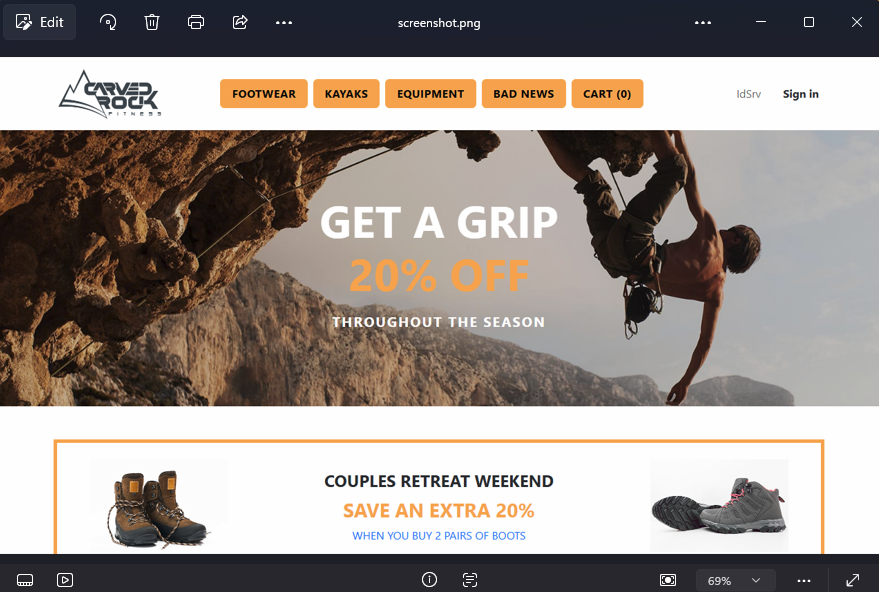
Screenshots are a one-liner anywhere in a test:
1await Page.ScreenshotAsync(new() { Path = "playwright-artifacts/screenshot.png" });
Video is where I ended up writing a little custom plumbing, because Playwright's
out-of-the-box behavior has two annoyances: you enable recording per context
(not per test), and it names the files page@<hash>.webm. Neither is great once
CI has uploaded a dozen of them.
So: a custom [RecordVideo] attribute. The interesting bit is that it uses
TUnit's ITestDiscoveryEventReceiver and StateBag rather than reflection --
which keeps the whole thing source-generation and AOT friendly:
 1// The StateBag is used to avoid reflection and use TUnit source generation approach
 2[AttributeUsage(AttributeTargets.Method)]
 3public sealed class RecordVideoAttribute : Attribute, ITestDiscoveryEventReceiver
 4{
 5    internal const string StateBagKey = "CarvedRock.RecordVideo";
 6
 7    public ValueTask OnTestDiscovered(DiscoveredTestContext discoveredTestContext)
 8    {
 9        discoveredTestContext.TestContext.StateBag[StateBagKey] = true;
10        return default;
11    }
12}
CustomPageTest then reads that flag when it builds the browser context -- so a
single attribute on a test method turns recording on for just that test, at a
viewport size that actually looks good in a demo:
 1public override BrowserNewContextOptions ContextOptions(TestContext testContext)
 2{
 3    var options = base.ContextOptions(testContext);
 4    options.IgnoreHTTPSErrors = true;
 5
 6    if (testContext.StateBag.ContainsKey(RecordVideoAttribute.StateBagKey))
 7    {
 8        options.RecordVideoDir = "playwright-artifacts/";
 9        options.ViewportSize = new ViewportSize { Width = 1280, Height = 1400 };
10    }
11
12    return options;
13}
Renaming is the fiddly part, and the comment in the repo explains why it happens at the end of the session rather than after each test:
 1// Playwright names its recordings page@<hash>.webm, which tells you nothing about
 2// which test produced which video once CI has uploaded a dozen of them. The name
 3// can't be set through RecordVideoDir, and IVideo.SaveAsAsync waits for the page to
 4// close - which hasn't happened yet inside an [After(Test)] hook. So note where each
 5// video is headed while the test runs, then rename them all at the end of the
 6// session, by which point every browser context has been torn down and flushed.
 7private static readonly ConcurrentBag<(string TestName, string SourcePath)>
 8    RecordedVideos = [];
 9
10[Before(Test)]
11public async Task NoteVideoPathForRenaming(TestContext testContext)
12{
13    if (Page.Video is null) return;
14
15    // A retried test records once per attempt; number them so the flaky-test videos
16    // line up with the attempts shown in the run report instead of overwriting.
17    var attempt = testContext.Execution.CurrentRetryAttempt;
18    var name = testContext.Metadata.TestName +
19               (attempt > 0 ? $"-attempt{attempt + 1}" : string.Empty);
20
21    RecordedVideos.Add((name, await Page.Video.PathAsync()));
22}
23
24[After(TestSession)]
25public static void RenameRecordedVideos()
26{
27    foreach (var (testName, sourcePath) in RecordedVideos)
28    {
29        // ... File.Move to <TestName>.webm, de-duplicating if needed ...
30        // A recording we couldn't rename is still a usable recording - never fail
31        // a run (or hide the real result) over cosmetic artifact naming.
32    }
33}
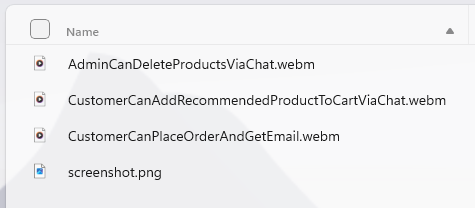
The result is a playwright-artifacts/ folder with files called
CustomerCanPlaceOrderAndGetEmail.webm -- and, on a flaky retry,
CustomerCanPlaceOrderAndGetEmail-attempt2.webm right next to it, which lines up
with the attempts shown in the run report.
One more Playwright-specific practicality.
Throttle browser parallelism. Every browser test is a Chromium instance on top of the whole Aspire app, and CI runners are not generous machines:
 1// Browser tests are the heaviest thing in this suite: every one is its own Chromium
 2// instance, running on top of the Aspire AppHost (two containers plus four services)
 3// and whatever the sibling test projects are doing in the same `dotnet test` run.
 4public record BrowserParallelLimit : IParallelLimit
 5{
 6    public int Limit => 3;
 7}
 8
 9[ParallelLimiter<BrowserParallelLimit>]
10public partial class WebAppTests : CustomPageTest { /* ... */ }
Finally: the chat-driven tests assert on LLM output, which is non-deterministic by nature. The pattern that works is a soft assertion on the chat text plus a hard assertion on the resulting state:
1await Expect(Page.Locator("#chatMessages"))
2        .ToContainTextAsync("successfully",  // be careful - non-deterministic!!
3            options: new() { Timeout = 15_000 });
4
5// the real assertion: the products are actually gone from the database
6var actualProduct = await Fixture.TestDbContext.Products
7                        .FirstOrDefaultAsync(p => p.Id == 20 || p.Id == 23);
8await Assert.That(actualProduct).IsNull();
Logs and Traces for Every Test
This is the feature I didn't know I wanted, and now won't do without.
TUnit produces a run report -- one JSON file and one HTML file per test project,
in TestResults/. The HTML report contains an Overview: an execution
timeline, per-class timelines, slowest tests, where time was spent, parallel
execution, categories, and failures.
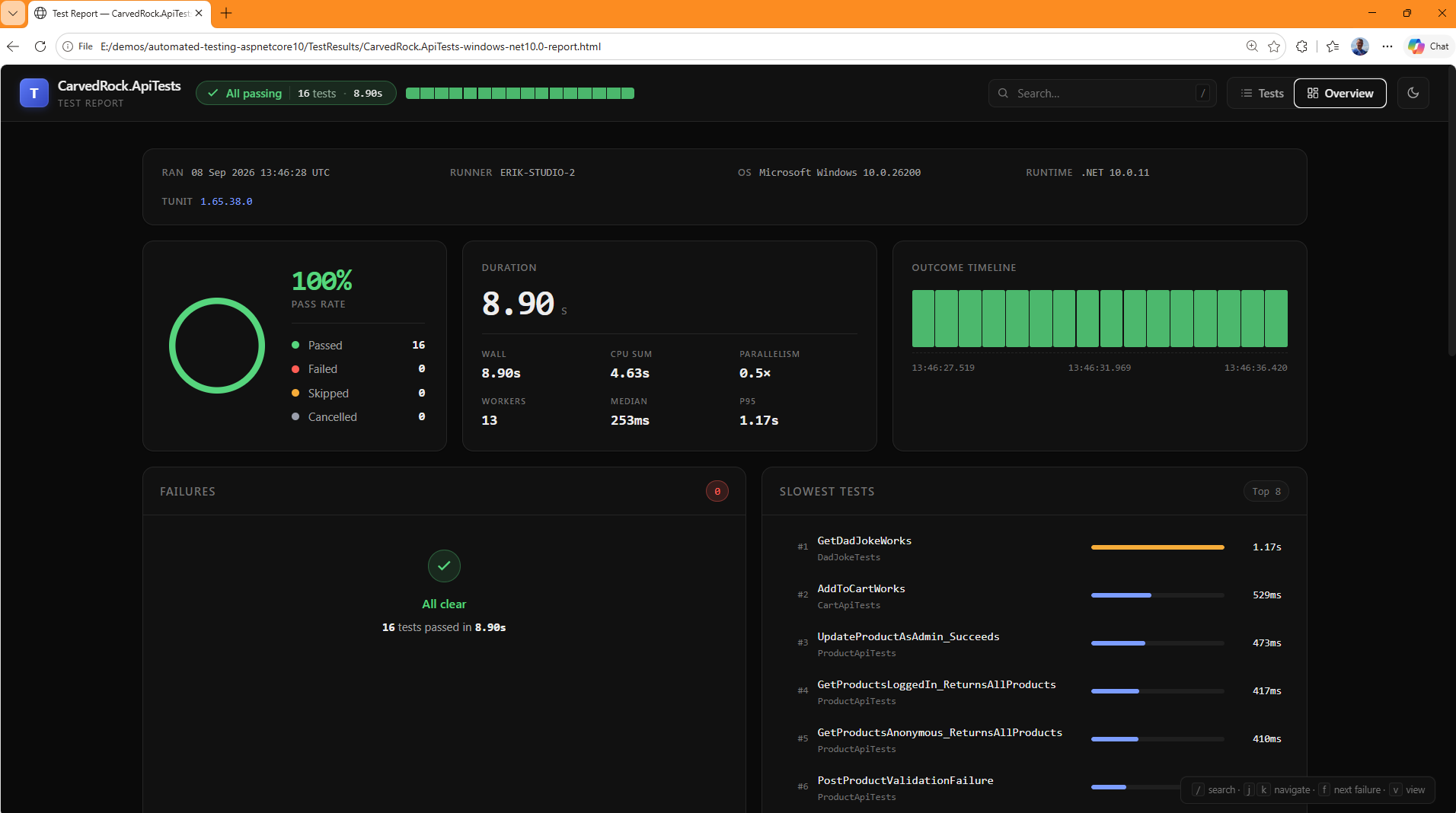
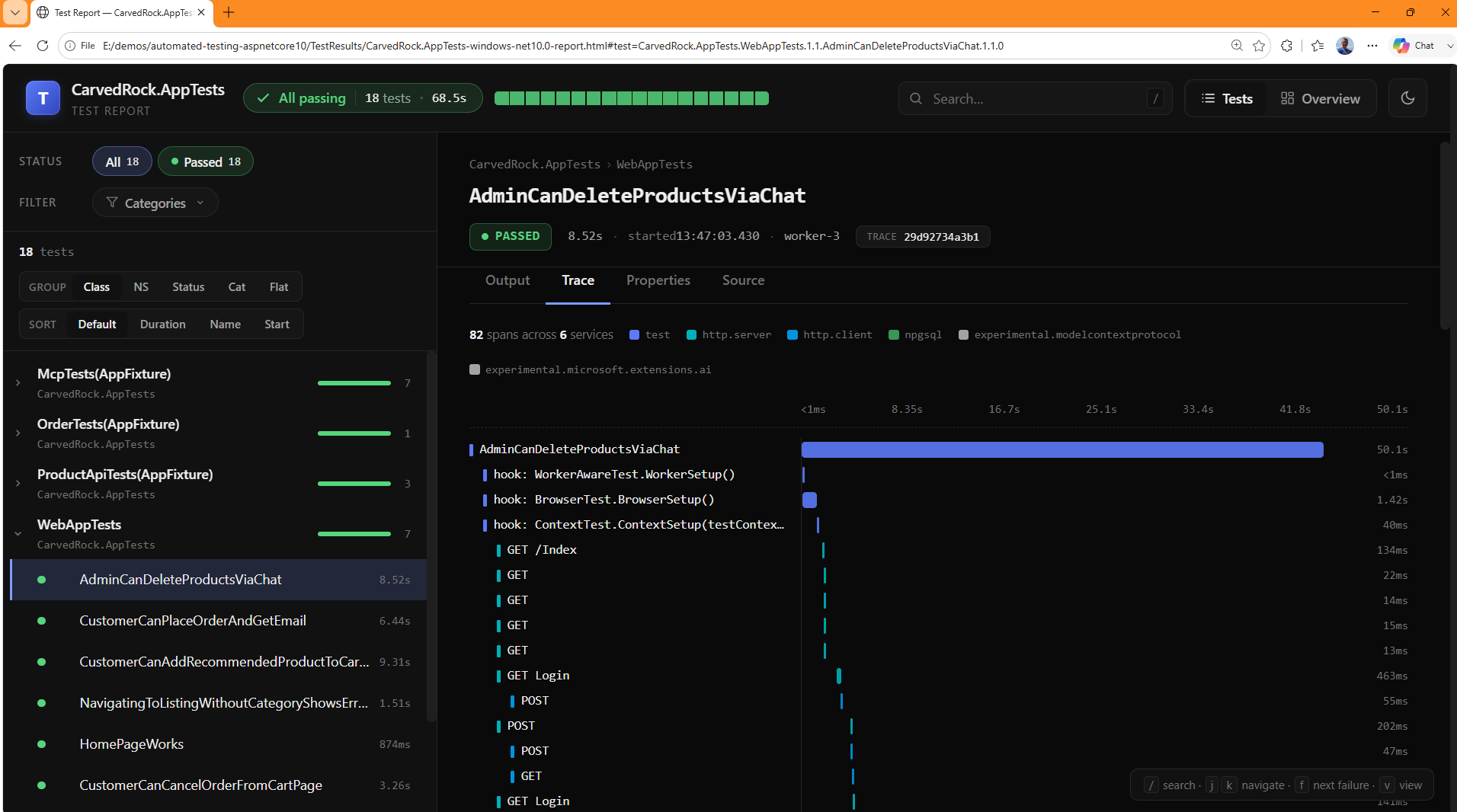
Then you click an individual test and get four tabs: Output, Trace, Properties, and Source.
The Output tab is where the Aspire integration pays off. Remember that
EnableTelemetryCollection starts an OTLP receiver and correlates telemetry back
to the test that caused it. So for the order test, the output contains log lines
emitted by the API service running in a separate process, prefixed by resource
name, interleaved with the test's own logging:
1[api] [Information] Adding product 30 to cart.
2[api] [Information] Adding product 1 to cart.
3[api] [Information] Adding product 42 to cart.
4[api] [Information] Adding product 30 (qty 1) to cart for m2m
5[api] [Information] Created order 1 with 3 line(s).
6[api] [Information] Order confirmation email sent to unknown@carvedrock.com for order 1.
7[api] [Information] Placed order 1 for m2m.
8Information: ACTUAL: [ 30, Calm Waters Touring Kayak, 1, 699.99 ]
9Information: EXPECTED: Product { Id = 30, Name = Calm Waters Touring Kayak, ... }
Your own test logging goes through TestContext, so it lands in the right test's
output even with everything running in parallel:
1protected static DefaultLogger TestLogger => TestContext.Current!.GetDefaultLogger();
2
3// ...then anywhere in a test:
4TestLogger.LogInformation($"ACTUAL: [ {ordered.ProductId}, {ordered.ProductName}, " +
5                          $"{ordered.Quantity}, {ordered.UnitPrice} ]");
The Trace tab is the other half. Which means for one test you can see, with timings:
1   187.0ms  [Experimental.System.Net.Http.Connections] HTTP wait_for_connection demo.duendesoftware.com:443
2   241.7ms  [System.Net.Http] POST                      <- fetching the access token
3   558.7ms  [Microsoft.AspNetCore] POST Cart            <- the API handling the request
4     1.4ms  [Npgsql] postgresql                         <- the SQL it ran
5   134.9ms  [Npgsql] postgresql
Database calls, HTTP calls, MCP tool calls, AI calls, and SMTP sends -- attributed to the individual test that caused them. When an integration test fails in CI at 2am, this is the difference between "something timed out" and "the token request to the external IdP took 30 seconds."
And critically: none of this requires test-specific code in the application.
The services export OpenTelemetry because they use Aspire's standard
ServiceDefaults. TUnit just points the OTLP endpoint at itself for the duration
of the run.
The JSON report next to the HTML one has all the same data in a machine-readable shape -- which matters a lot for the agent section at the end of this post.
Coverage Reporting
Because everything runs on Microsoft Testing Platform, coverage is a command-line flag rather than a separate tool invocation:
1dotnet test --coverage --coverage-output-format cobertura --coverage-settings testconfig.json
That drops one raw cobertura file per test project into TestResults/. They're
GUID-named, so don't try to identify projects by filename -- generate a report
instead.
Report Generation
The excellent ReportGenerator turns those cobertura files into something humans (and PR reviewers) can use. Install it once:
1dotnet tool install -g dotnet-reportgenerator-globaltool
Then merge all three projects' coverage into a single report:
1reportgenerator -reports:TestResults/*.cobertura.xml -targetdir:coveragereport -reporttypes:"Html;TextSummary;"
Merging matters more than it sounds. A line in ProductLogic might only be
covered by an app test, and a line in NewProductValidator only by a unit test --
looking at either report alone would badly understate your coverage. The glob
across all three cobertura files gives you the real number.
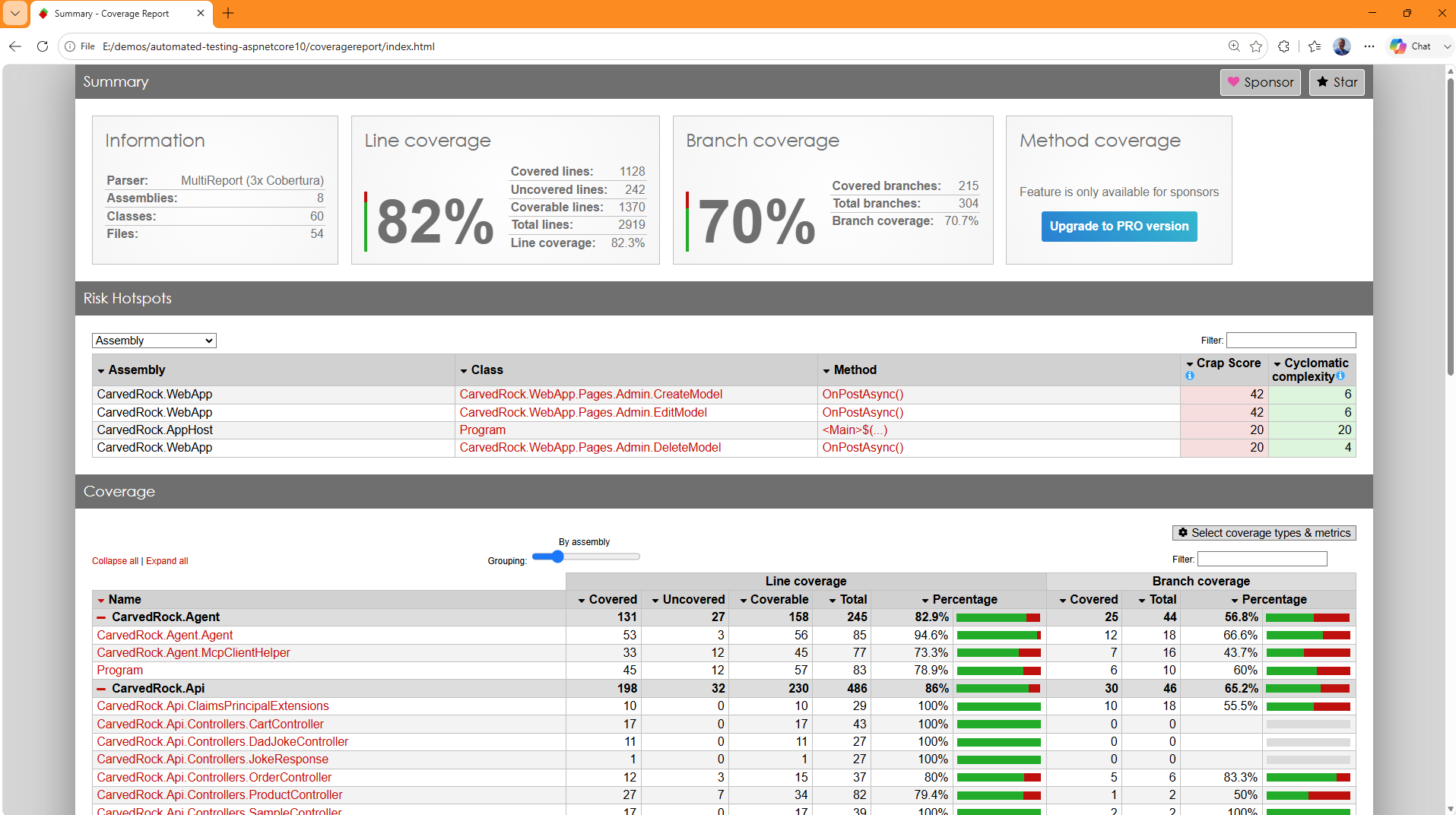
TextSummary is the report type I'd add if you add nothing else: it produces a
Summary.txt that's a perfect at-a-glance rollup, and it's plain text so you can
diff it, grep it, or hand it to an agent:
 1Summary
 2  Generated on: 9/4/2026 - 9:49:16 AM
 3  Parser: MultiReport (3x Cobertura)
 4  Assemblies: 8
 5  Classes: 60
 6  Line coverage: 82.3%
 7  Covered lines: 1128
 8  Uncovered lines: 242
 9  Branch coverage: 70.7% (215 of 304)
10  Method coverage: 83.7% (134 of 160)
11
12CarvedRock.Api                                                86.0%
13  CarvedRock.Api.Controllers.CartController                  100.0%
14  CarvedRock.Api.Controllers.ProductController                79.4%
15  CarvedRock.Api.ValidationExceptionHandler                   79.3%
16
17CarvedRock.Domain                                            100.0%
18  CarvedRock.Domain.CartLogic                                100.0%
19  CarvedRock.Domain.NewProductValidator                      100.0%
20  CarvedRock.Domain.OrderLogic                               100.0%
21  CarvedRock.Domain.ProductLogic                             100.0%
22
23...
82.3% overall, with the business logic at 100% -- and the gaps are consciously omitted areas for someone else to practice with.
Excluding Things
An unfiltered coverage number is misleading in both directions, and the noise makes the report harder to act on. Auto-properties, EF Core migrations, source-generated mapper output, and DTO/entity files all pad the denominator without telling you anything.
The --coverage-settings testconfig.json flag above points at this:
 1{
 2  "Configuration": {
 3    "CodeCoverage": {
 4      "SkipAutoProperties": true,
 5      "Functions": {
 6        "Exclude": [
 7          "^Microsoft\\..*",
 8          "^System\\..*",
 9          "^CarvedRock\\.Data\\.Migrations\\..*"
10        ]
11      },
12      "Sources": {
13        "Exclude": [
14          ".*\\\\Riok.Mapperly\\\\.*",
15          ".*\\\\.*Models.*",
16          ".*\\\\.*Model.*",
17          ".*\\\\.*Entities.*",
18          ".*\\\\MailKit.Client\\\\.*"
19        ]
20      }
21    }
22  }
23}
Three kinds of exclusion, all worth understanding:
SkipAutoProperties-- the single highest-value setting here. Every{ get; set; }is technically a coverable line, and including them means your DTOs quietly inflate the number.Functions.Exclude-- regex on fully-qualified names. Framework code and EF Core migrations are the obvious candidates; migrations in particular are generated, already ran to produce your schema, and will never be meaningfully "tested."Sources.Exclude-- regex on file paths (note the escaped backslashes). This is how you drop source-generated output like Riok.Mapperly's mapper implementations, plus models/entities and, in this repo, a hand-rolled Aspire client integration.
The full set of options is documented in the Microsoft code coverage configuration reference.
My general advice: exclude things you don't intend to cover, and nothing else. The point of excluding isn't a bigger number, it's a report where every red line is a real decision you get to make.
Local Execution Script
All of the above collapses into one script, which is what I actually run:
 1param(
 2    [switch]$ShowReports
 3)
 4
 5Remove-Item -Recurse -Force -ErrorAction SilentlyContinue TestResults, coveragereport, "tests/CarvedRock.AppTests/bin/Debug/Net10.0/playwright-artifacts"
 6
 7dotnet test --coverage --coverage-output-format cobertura --coverage-settings testconfig.json
 8
 9reportgenerator -reports:TestResults/*.cobertura.xml -targetdir:coveragereport -reporttypes:"Html;TextSummary;"
10
11if ($ShowReports) {
12    Invoke-Item ./coveragereport/index.html
13    Invoke-Item ./TestResults/*.html
14}
Fourteen lines, and every one of them earns its place:
- Delete first. Stale artifacts from a previous run are how you end up
debugging a video from twenty minutes ago, or reporting coverage that includes a
project you deleted. The
-ErrorAction SilentlyContinuekeeps it quiet on a clean checkout. - One
dotnet testruns all three projects, concurrently. - Report generation merges the three cobertura files.
-ShowReportsis opt-in. During a tight loop you want the exit code and nothing else; when you're reviewing, four browser tabs open (three TUnit reports plus coverage) and you can see everything.
1./test-with-coverage.ps1              # just run them
2./test-with-coverage.ps1 -ShowReports # run them and open everything
For a tighter loop, skip the script and target a single project or test. TUnit's
tree-node filter follows /Assembly/Namespace/Class/Test and takes wildcards:
1# one project
2dotnet run --project tests/CarvedRock.UnitTests
3
4# one class
5dotnet run --project tests/CarvedRock.UnitTests --treenode-filter "/*/*/ProductValidationTests/*"
6
7# one test
8dotnet run --project tests/CarvedRock.ApiTests --treenode-filter "/*/*/*/GetDadJokeWorks"
That last form is what you want when you're iterating on a single Playwright test and re-watching its video.
Continuous Integration Pipeline
The CI pipeline runs the same commands and then does the one thing the local script can't: makes the results visible to people who weren't at the keyboard.
The build and setup steps are mostly what you'd expect, with one Linux-specific wrinkle. Playwright's Chromium on Linux doesn't trust ASP.NET Core's dev certificate the way Windows does, so the certs get cleaned, re-created, and exported for OpenSSL:
 1- name: Ensure browsers are installed
 2  run: pwsh tests/CarvedRock.AppTests/bin/Release/net10.0/playwright.ps1 install --with-deps chromium
 3
 4- name: Clear any existing dev certs
 5  run: dotnet dev-certs https --clean
 6
 7- name: Export SSL_CERT_DIR for OpenSSL trust
 8  run: echo "SSL_CERT_DIR=$HOME/.aspnet/dev-certs/trust:/usr/lib/ssl/certs" >> "$GITHUB_ENV"
 9
10- name: Create and trust https certificate
11  run: dotnet dev-certs https --trust
(That's the other half of the IgnoreHTTPSErrors = true in CustomPageTest --
belt and suspenders for a problem that only shows up in CI.)
The test step is the same command as local, with the platform options after a --
separator and the OpenAI key supplied as the Aspire parameter the AppHost expects:
 1- name: Run tests with coverage
 2  env:
 3    Parameters__openaiKey: ${{ secrets.OPENAI_KEY }}
 4  run: |
 5    dotnet test \
 6      --configuration Release \
 7      --no-build \
 8      --results-directory ./TestResults \
 9      -- \
10      --coverage \
11      --coverage-output-format cobertura \
12      --coverage-settings testconfig.json \
13      --report-trx
Note there's no Docker setup step. Testcontainers and Aspire both use the
container runtime that GitHub's ubuntu-latest runner already provides, so the
full distributed application -- Postgres, MailPit, four services -- comes up with
no extra pipeline configuration at all.
Coverage gets rendered by the ReportGenerator action, with MarkdownSummaryGithub
added specifically so it can be posted as a comment:
1- name: ReportGenerator
2  if: always() # Run even if tests fail
3  uses: danielpalme/ReportGenerator-GitHub-Action@5.5.11
4  with:
5    reports: "./TestResults/*.cobertura.xml"
6    targetdir: "coveragereport"
7    reporttypes: "MarkdownSummaryGithub,Html"
8    tag: "${{ github.run_number }}_${{ github.run_id }}"
if: always() is doing real work there. A failed test run is exactly when you
most want the coverage report and the artifacts, so every reporting step is marked
this way.
Then the good part -- the results go where people will actually see them:
1- name: Add comment to PR
2  if: github.event_name == 'pull_request'
3  run: gh pr comment $PR_NUMBER --edit-last --create-if-none --body-file coveragereport/SummaryGithub.md
4  env:
5    PR_NUMBER: ${{ github.event.number }}
6
7- name: Publish coverage in build summary
8  run: cat coveragereport/SummaryGithub.md >> $GITHUB_STEP_SUMMARY
--edit-last --create-if-none is a small kindness: it updates the existing
coverage comment on each push rather than burying the PR conversation under
fifteen near-identical bot comments.
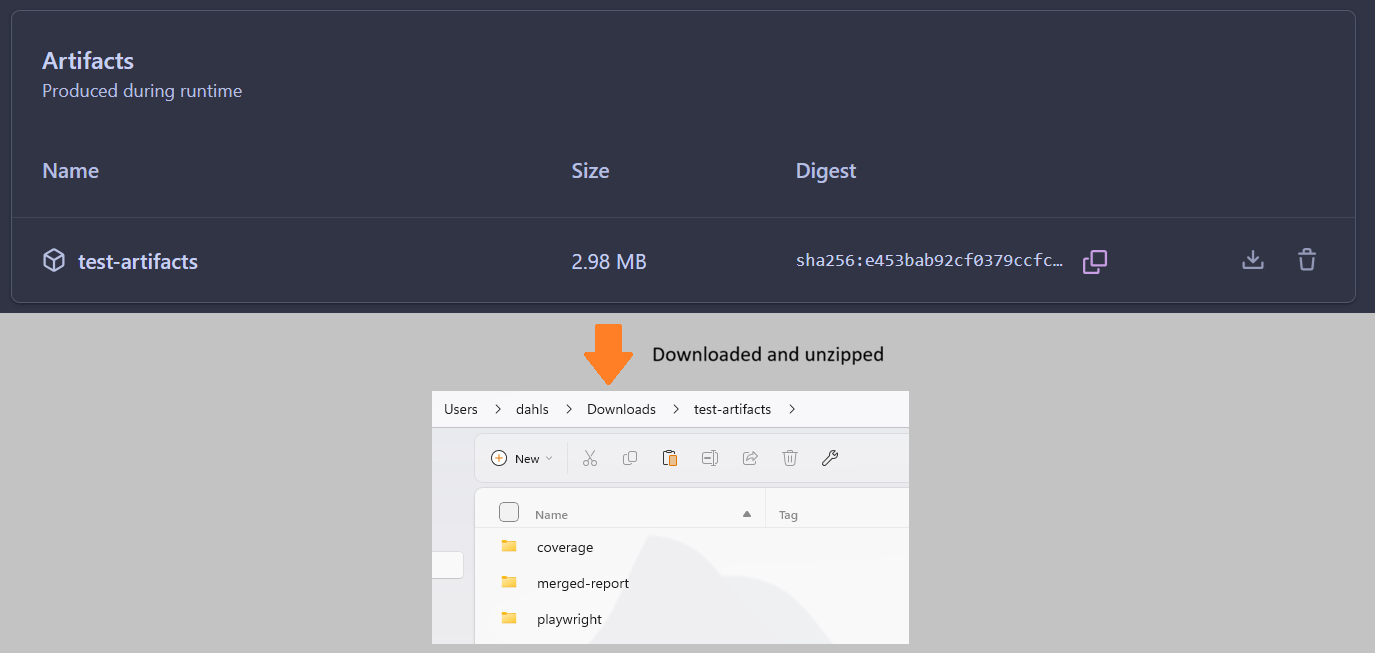
Everything a human might want to dig into gets staged into one downloadable artifact -- the merged coverage report, the merged TUnit report, and the Playwright screenshots and videos:
 1- name: Stage combined artifacts
 2  if: always()
 3  run: |
 4    mkdir -p combined-report/coverage combined-report/merged-report combined-report/playwright
 5    cp -r coveragereport/. combined-report/coverage/ 2>/dev/null || true
 6    cp -r ${{ runner.temp }}/tunit-aggregate/**/merged-report.html combined-report/merged-report/ 2>/dev/null || true
 7    cp -r ./tests/CarvedRock.AppTests/bin/Release/net10.0/playwright-artifacts/. combined-report/playwright/ 2>/dev/null || true
 8
 9- name: Upload combined test artifacts
10  if: always()
11  uses: actions/upload-artifact@v7
12  with:
13    name: test-artifacts
14    path: combined-report
Being able to download a video of the exact browser session that failed on a CI runner you can't SSH into is, I think, the single biggest quality-of-life improvement in this whole setup.
Coding Agent Setup
Here's the thesis of this last section: everything above is even more valuable to a coding agent than it is to you. An agent can't eyeball a browser or "just try it." What it can do is run a command, read structured output, and iterate -- and this framework is unusually good at giving it all three.
Four things to set up.
1. Initialize the repo for your agent. Whatever you use, this usually means a
CLAUDE.md or AGENTS.md in the repo root describing the architecture and
conventions.
2. Run aspire agent init. This installs the Aspire skills that let an agent
understand and interact with your distributed app properly -- starting and
stopping it, listing resources, reading logs and traces -- instead of guessing at
dotnet run and hardcoded ports. See the
Aspire docs on AI coding agents.
3. Wire up MCP servers. Two are worth having here:
 1{
 2  "mcpServers": {
 3    "aspire": {
 4      "command": "aspire",
 5      "args": ["agent", "mcp"]
 6    },
 7    "playwright": {
 8      "command": "npx",
 9      "args": ["-y", "@playwright/mcp@latest"]
10    }
11  }
12}
The Playwright MCP server is the one that surprised me. It lets the agent drive a real browser to explore the app -- find the actual accessible name of a button, confirm a flow works by hand -- before it writes the test that asserts on it. That turns "write a Playwright test" from guesswork into transcription.
4. Tell the agent where the results are. This is the highest-leverage thing you can add, and it's a paragraph:
Running the tests is a single script (
test-with-coverage.ps1). After a run,coveragereport/Summary.txthas a per-assembly/class coverage rollup -- read that instead of the cobertura XML. Machine-readable test results are inTestResults/*.tunit-report.json(per-test status, duration, output, and spans). Raw cobertura files are GUID-named and don't identify their project, so don't grep them directly.
Every one of those sentences prevents a specific failure mode I watched happen.
Without them an agent will cheerfully grep 300KB of cobertura XML, or try to match
a GUID filename to a project, and burn a lot of context doing it. The
tunit-report.json files are the important pointer: an agent can read exact
failure output and per-test timings without parsing HTML or scraping console
output.
Planning and Implementing Features
The workflow that's been working for me is: plan first, save the plan in the repo, and make tests non-negotiable in the plan.
Here's a real prompt from this repo:
 1Need to plan the implementation of a new feature: the AI chat accessible
 2from the listing page should be able to add a recommended item or items
 3to the cart.  When the chat provides the recommendations, it should have a
 4way to ask a follow up question about whether they would like any
 5of the items added to the cart, and if the user says yes in some way,
 6then the appropriate items should be added to the cart. Make sure that
 7the text on the cart button is updated to reflect the added item. A playwright
 8test or test (with a video recording) should be created to verify
 9the new functionality.  Please create a plan for this work that I can
10review and save it in the repo so that I can edit manually if needed.
Three details in that prompt are doing the work:
- "create a plan ... save it in the repo so that I can edit manually" -- you get a review gate before any code is written, in a file you can edit.
- "A playwright test (with a video recording) should be created" -- tests are part of the deliverable, not a follow-up.
- The specific UI assertion ("the text on the cart button is updated") gives the agent something concrete and checkable to aim at.
The plan that came back (saved to docs/plans/chat-add-to-cart-plan.md) correctly
identified that this wasn't "just add an MCP tool" -- the chat was fully stateless,
so a follow-up "yes, add it" had nothing to resolve "it" against -- and proposed a
design with trade-offs for me to sign off on. That's a conversation worth having
before implementation, and it only happened because the plan was a separate
reviewable step.
But the part I want to highlight is what that plan document looked like after implementation. It grew a section called "Implementation notes (found while building and testing this)," including this:
The test's
Cart (1)assertion is not safe against reruns. Unlike the ApiTests' per-session Testcontainers DB, this AppHost's Postgres survives across separate test runs -- carrying a leftover item count from a previous run into the next one. The test now clears the cart first.
That's a real bug in the test, found by running it repeatedly against the real
app, and it's exactly the class of problem you can't reason your way to from the
source. The final entry in that document reads: "Full ./test-with-coverage.ps1
run, 54/54 tests passing, 82.3% overall line coverage."
And in the repo, a video called CustomerCanAddRecommendedProductToCartViaChat.webm
showing the feature working end to end -- produced by the agent's own test run, on
its own machine, without me watching.
That's the loop worth building toward: the agent plans, implements, runs the real distributed application, reads structured results, fixes what it finds, and hands you a video of the feature working plus a coverage number. The tests aren't overhead on agentic development -- they're the feedback signal that makes it work at all.
Wrapping Up
The three tools each solve a different problem, and they compound:
- TUnit makes tests fast, parallel, and -- through its report -- legible, with per-test logs and traces you didn't have to instrument.
- Aspire means "the whole application" is a thing you can start from a test method, with real containers and no hardcoded ports or deployment step.
- Playwright covers the last mile through a real browser, with screenshots and videos as first-class artifacts.
54 tests. 82.3% coverage. About a minute to run. One script locally, the same commands in CI (slightly longer to run due to more installs / plumbing), and structured output that both humans and agents can act on.
The full working repo is at
dahlsailrunner/automated-testing-aspnetcore10
-- and the readme.md has a list of deliberately-omitted tests if you'd like to
practice with the setup yourself.